| Item | Description | Remarks |
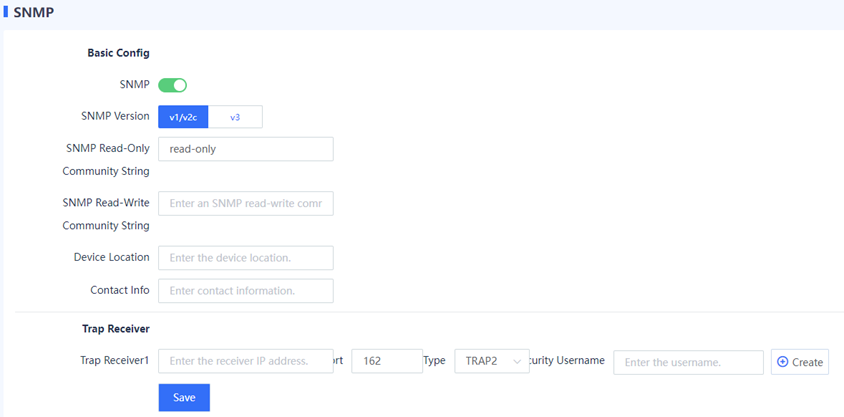
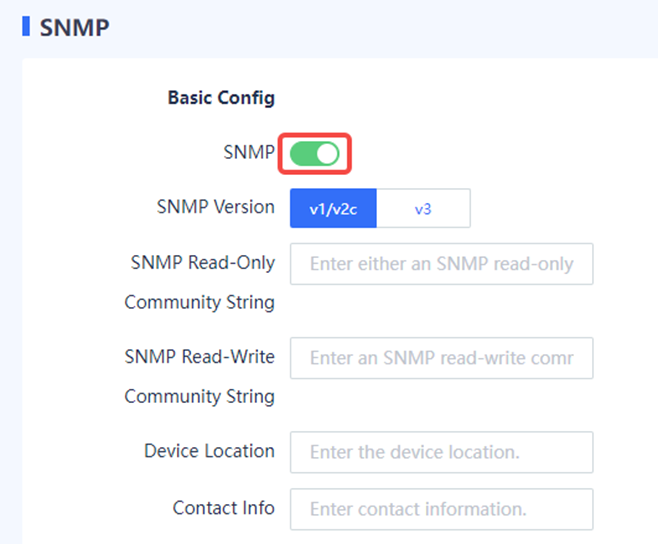
| SNMP Version | Version number of SNMP. The options are v1/v2c and v3. | The selected version must match that of the NMS server. [Example] v3 |
| SNMP Version: v1/v2c | ||
| SNMP Read-Only Community String | Community name used for authentication between the managed device and NMS server. If the NMS user uses a read-only community name for authentication, the user possesses the read-only permission to query device information. | The value must be the same as the read-only community name on the NMS. Otherwise, access from the NMS to the device may fail. Characters such as `~!#%^&*+\|{};:'"/<>? and spaces are not allowed. [Example] public |
| SNMP Read-Write Community String | Community name used for authentication between the managed device and NMS server. If the NMS user uses a read-write community name for authentication, the user possesses the read-write permission on device configuration. | The value must be the same as the read-write community name on the NMS. Otherwise, access from the NMS to the device may fail. Characters such as `~!#%^&*+\|{};:'"/<>? and spaces are not allowed. [Example] private |
| SNMP Version: v3 | ||
| Security Username | Username used by the NMS user to access the managed device. | The value must be the same as that on the NMS. Characters such as `~!#%^&*+\|{};:'"/<>? and spaces are not allowed. [Example] user1 |
| Authentication Algorithm | Authentication algorithm used to verify the user identity. MD5 and SHA algorithms are supported. | The value must be the same as that on the NMS. [Example] MD5 |
| Authentication Key | Password used to verify whether the NMS user is valid. | The value must be the same as the authentication password configured on the NMS. [Example] authkey |
| Encryption Algorithm | Encryption algorithm used to encrypt the transmitted data. AES and DES algorithms are supported. | The value must be the same as that on the NMS. [Example] AES |
| Encryption Key | Password used to encrypt the transmitted data. | The value must be the same as the encryption password configured on the NMS. [Example] prikey |
| Device Location | Physical location of the managed device. This information allows the administrator to quickly locate a faulty device. | - |
| Contact Info | Contact information of the maintenance engineer of the managed device. This information allows the administrator to easily get in touch with the device-related personnel. | - |
| Trap Receiver Click Create to add a trap receiver. | ||
| Trap Receiver | Destination host address that receives the Trap message. | [Example] 1.1.1.2 |
| Port | Number of the port used by the managed device to send a Trap message to the destination host. The default value is 162. | [Example] 162 |
| Type | Trap type. The options are TRAP, TRAP2, and INFORM. | The type is TRAP2 in most cases. [Example] TRAP2 |
| Security Username | Credential used by the device to report alarm information to the NMS server. | The value must be the same as that on the NMS server. [Example] user1 |
| Welcome to Ruijie Community (https://community.ruijie.com/) | Powered by Discuz! X3.2 |