Ruijie Community

Title: RG-NIS2100 Managed mode not shown in Cloud config [Print this page]

Author: zanini.f@korall    Time: 2026-10-8 00:24
Title: RG-NIS2100 Managed mode not shown in Cloud config
Edited by K-Net at 2026-10-8 00:30

RG-NIS2100-8GT2SFP-HP , latest ESW_1.0(1)B1P58,Release(13202515) firmware.
Locally enabled VLAN mode
Vlans configured correctly , including Vlan managemen Ip address
All is working fine but going to Cloud configuration->VLAN it is still in Un-managed Mode.
Is it a bug?
Is it safe enabling once again the managed mode via Cloud config ?
Before doing so via Cloud it says :
Tip
Once the switch is switched to the management mode, all ports of the switch will be in access VLAN 1, and upstream devices may be unable to access the Internet. Configure VLANs as needed after mode switching.

So I suppose I will lose connectivity due to Vlan reset.
Please let me know.
Thanks.

Author: v-jasonreyesrio    Time: 2026-10-8 04:57
Hello,
Apologies for the inconvenience, but the information is unclear, is it possible to share a capture of the output you mention?
If you need help about VLANs configuration for your device, you can check the information in the following manual:  https://reyee.ruijie.com/en-global/support/documents/slide_rg-es2-nis2100-series-switches-1-0-1-b1p58-configuration-guide/#_Toc231287758
If you need further help, you can contact us in Rita Live chat to have a more dynamic conversation, we can help you check your service: https://www.ruijienetworks.com/rita
Regards.

Author: zanini.f@korall    Time: 2026-10-8 23:54
Edited by K-Net at 2026-10-8 23:56

GTAC-Jason replied at 2026-10-8 04:57
Hello,
Apologies for the inconvenience, but the information is unclear, is it possible to share a ca ...
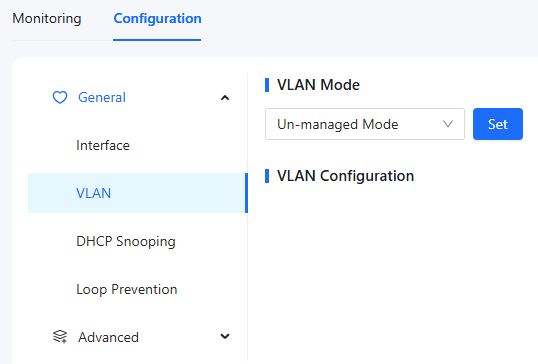
I'll try to be more clear:
I have configured this switch via web interface inside my LAN
I have enabled the Managed mode
I have configured all Vlans
I switched the management IP address 192.168.99.100 to vlan 99 and it can reach internet.
All is working fine.
Then I have connected successfully this switch to Ruijie cloud,  dedicated project.
Once I login to Ruijie cloud to manage the switch , if I go to CONFIGURATION-VLAN , it shows the switch still in UN-MANAGED mode:

But this is not true, as said, the switch has been configured with all VLANs and it is working perfectly in this mode.
That's the problem.

Author: v-jasonreyesrio    Time: 2026-10-9 04:51
K-Net replied at 2026-10-8 23:54
GTAC-Jason replied at 2026-10-8 04:57
Hello,
Apologies for the inconvenience, but the information is ...

I understand, according to the documentation, the VLAN is shown as unmanaged if the VLAN is disabled.

As I understand, you are using VLAN99 instead of VLAN1 as the native VLAN, right? There could be a synch mismatch between the local and the cloud information. You can try to upgrade the topology from the cloud:

If the issue persists, I would suggest to contact us in Rita live chat to check the issue directly in your project.
Regards.

Author: zanini.f@korall    Time: 2026-10-9 22:22
GTAC-Jason replied at 2026-10-9 04:51
K-Net replied at 2026-10-8 23:54
GTAC-Jason replied at 2026-10-8 04:57
Hello,

Topology update didn't solve the issue.
Further info:
I'm configuring the switch via PC browser connected locally to switch LAN
At the same time I am connected with another PC to Ruijie cloud.
If I made a change (i.e. I disable an ethernet port) via cloud interface, I can see immediately this change on the local LAN PC config page.
If I made a change (i.e. re-enable that ethernet port) via local PC , I see immediately the change on Ruijie cloud.

So all is perfectly synced.

The problem is the VLAN section on cloud interface is still displayed as Un-managed (see my previous post).

That's why this makes me think to a bug.

On the same LAN/Project there are also three NBS3200 series switch, NO issue at all with displayed cloud configuration.


Author: v-chengyuxin@ru    Time: 2026-10-9 22:45
K-Net replied at 2026-10-9 22:22
Topology update didn't solve the issue.
Further info:
I'm configuring the switch via PC browser co ...

Thank you very much for your reply, sir. This sounds very much like a bug issue. If it is convenient for you, could you please get in touch with me and my team via the real-time chat platform? Currently, replying through posts may not be conducive to us resolving this issue quickly and efficiently. Once we get in real-time contact, we will track this issue for you separately.


Author: zanini.f@korall    Time: 2026-10-11 17:53
GTAC-Eric replied at 2026-10-9 22:45
Thank you very much for your reply, sir. This sounds very much like a bug issue. If it is convenie ...

Sure,
I have to setup two NIS2100 more on the same LAN , let's see how they goes, then we'll meet via chat.

Author: zanini.f@korall    Time: 2026-10-12 20:11
Edited by K-Net at 2026-10-13 00:05

K-Net replied at 2026-10-11 17:53
Sure,
I have to setup two NIS2100 more on the same LAN , let's see how they goes, then we'll meet ...
Well, almost for sure a bug on Cloud interface.
I setup locally other two some model switches.
Upgraded to latest firmware version (released two days ago, I thought also for solving this issue)
Same issue.
I went to Cloud VLAN configuration setting and enabled VLAN (managed) mode.
I confirmed the Vlan mode switch despite the warning about all port would have been set to Vlan1.
Then I skipped any Vlan addition.
Exiting and entering back VLAN menu  et-voila' all VLANs previously configured locally are correctly displayed.
I noted, however, that no great of config is allowed via Cloud (Ip addresses, L3 interface, etc).
So the major impact configurations have still to be made accessing locally the switch IP address on its LAN.


Welcome to Ruijie Community (https://community.ruijie.com/) Powered by Discuz! X3.2
