Ruijie Community
Title: Password [Print this page]
Author: mulanoori7@gmai Time: 2026-10-13 14:34
Title: Password
How can I change the password
Author: v-yangzhenhao1@ Time: 2026-10-13 21:44
Edited by 杨朕豪 at 2026-10-13 21:53
Hi Mula Noori
For the Ruijie RG-WLAN Series Access Controllers such as RG-WS6512, you may refer to:
1. Use enable secret [ level level ] { [ 0 ] password | 5 encrypted-secret } to change the Secure Encrypted Password.
enable secret [ level level ] { [ 0 ] password | 5 encrypted-secret }
in chapter 1.3.1 User Access Control of the Configuration Guide
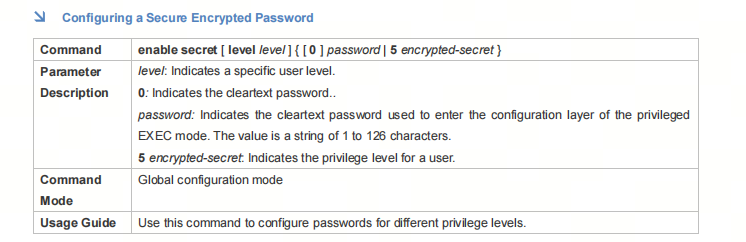
Examples:

2. Use webmaster level privilege-level username user-name password [ 0|7 ] password to change the web password.
webmaster level privilege-level username user-name password {0|7} password
in chapter 1.4.1 Configuring Passwords and Privileges of the Configuration Guide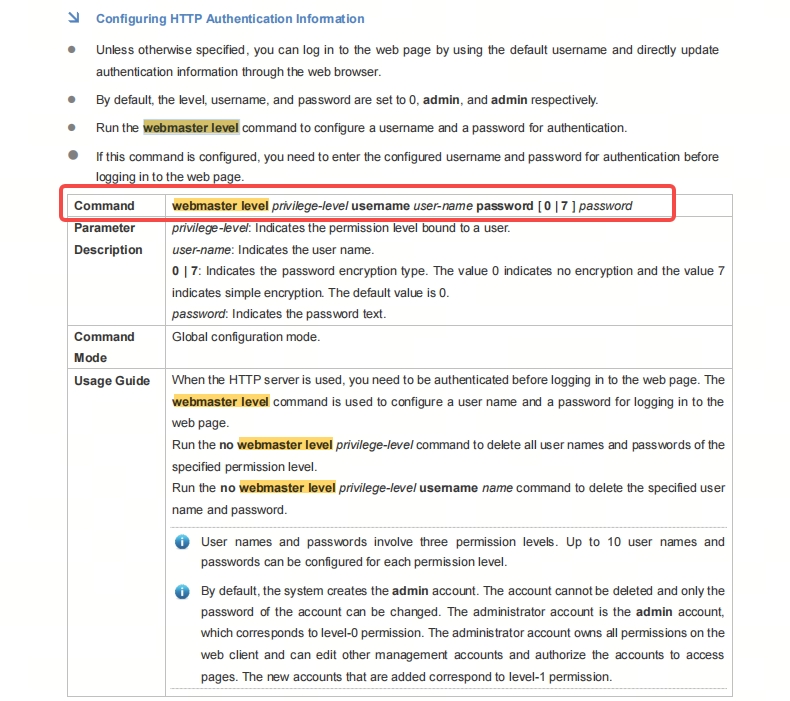
Examples:

Ruijie RG-WLAN Series Access Controllers AC_RGOS 11.9(6)W5B9P2 Configuration Guide (V1.1): https://www.ruijie.com/en-global/support/documents/slide_rg-wlan-series-access-controllers-ac-rgos-11-9-6-w5b9p2-configuration-guide/
If none of the above passwords are the one you want to change, please let me know exactly which password you need to change, and I will help you look it up.
| Welcome to Ruijie Community (https://community.ruijie.com/) |
Powered by Discuz! X3.2 |