Title: How to configure ACL with time range on NBR6215-E? [Print this page] Author: linyonghang1@ru Time: 2023-8-7 10:22 Title: How to configure ACL with time range on NBR6215-E? You can configure ACL with time range on NBR6215-E as follows:
1.cli configuration
(1)Configuring Time Range Parameters
Ruijie(config)# time-range work # Define a time period named work
Ruijie(config-time-range)# periodic daily 9:00 to 12:30
Ruijie(config-time-range)# periodic daily 14:00 to 18:30
(2)Configure the ACL associated with the time range
Ruijie(config)# ip access-list extended 100
Ruijie(config-ext-nacl)# 10 deny ip 192.168.1.0 0.0.0.255 any time-range work
# During work hours, deny any traffic from Intranet 192.168.1.0/24 to the Internet
Ruijie(config-ext-nacl)#20 permit ip any any
The ACL contains a deny any statement at the end of the ACL, denying all traffic
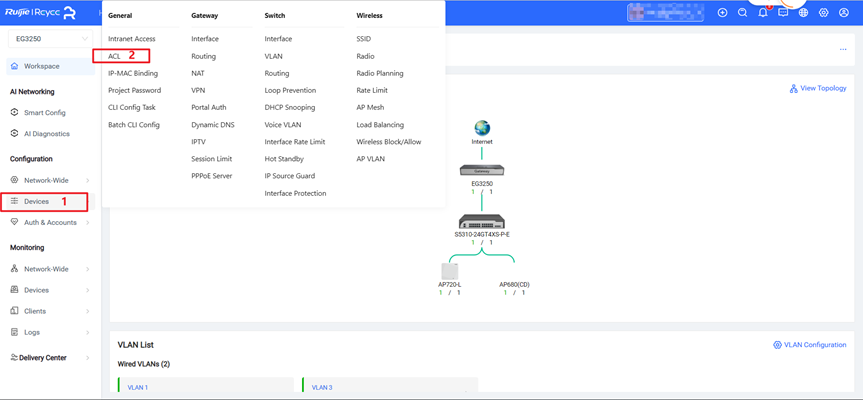
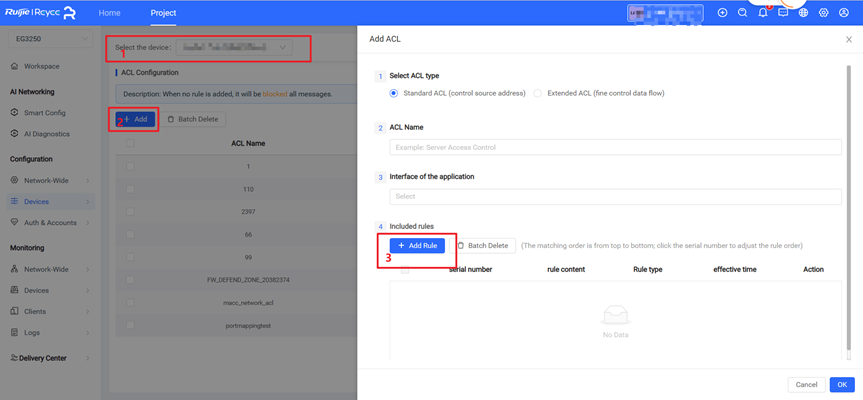
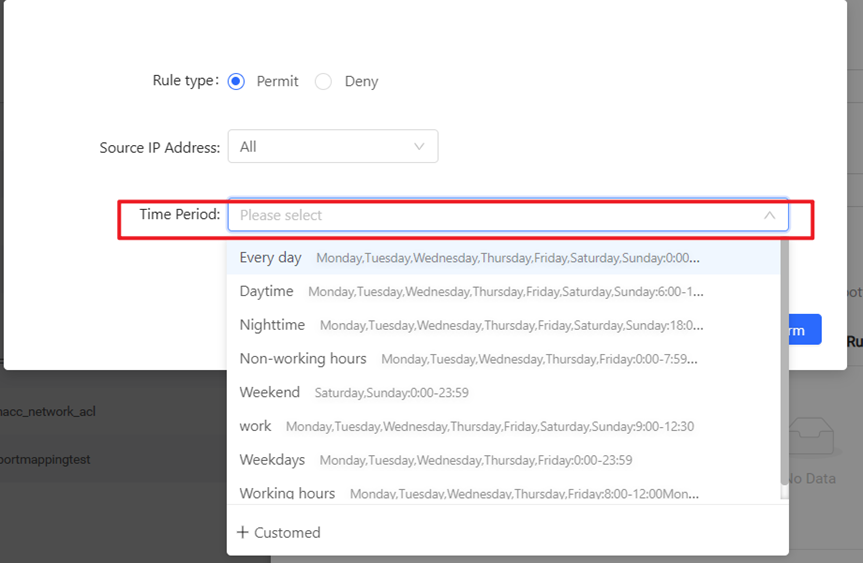
2. configure on new cloud
(1)Click Devices--->ACL
(2)Click Select the device--->Add--->Add Rule
(3)configure Time Period
Welcome to Ruijie Community (https://community.ruijie.com/)