Optimizing Pre-Staging Workflow for 100+ APs: Best Practices for Inventory Mapping & Batch Provisioning
Reply
Optimizing Pre-Staging Workflow for 100+ APs: Best Practices for Inventory Mapping & Batch Provisioning
Optimizing Pre-Staging Workflow for 100+ APs: Best Practices for Inventory Mapping & Batch Provisioning
Reply
Optimizing Pre-Staging Workflow for 100+ APs: Best Practices for Inventory Mapping & Batch Provisioning
|
Hi everyone, I’m currently managing a large-scale project (100+ Reyee APs). To ensure a smooth onsite installation and avoid "Identity Chaos" during maintenance, I want to optimize my Pre-Configuration (Day 0) workflow before sending technicians to the site. I’m looking for professional insights on your "Staging" process:
|
|
Dear Customer Good day! Regarding the first point: On the ruijie cloud platform, you can select the corresponding device and download the corresponding template; after entering the device's serial number and naming it, you can import it in batches into the project. 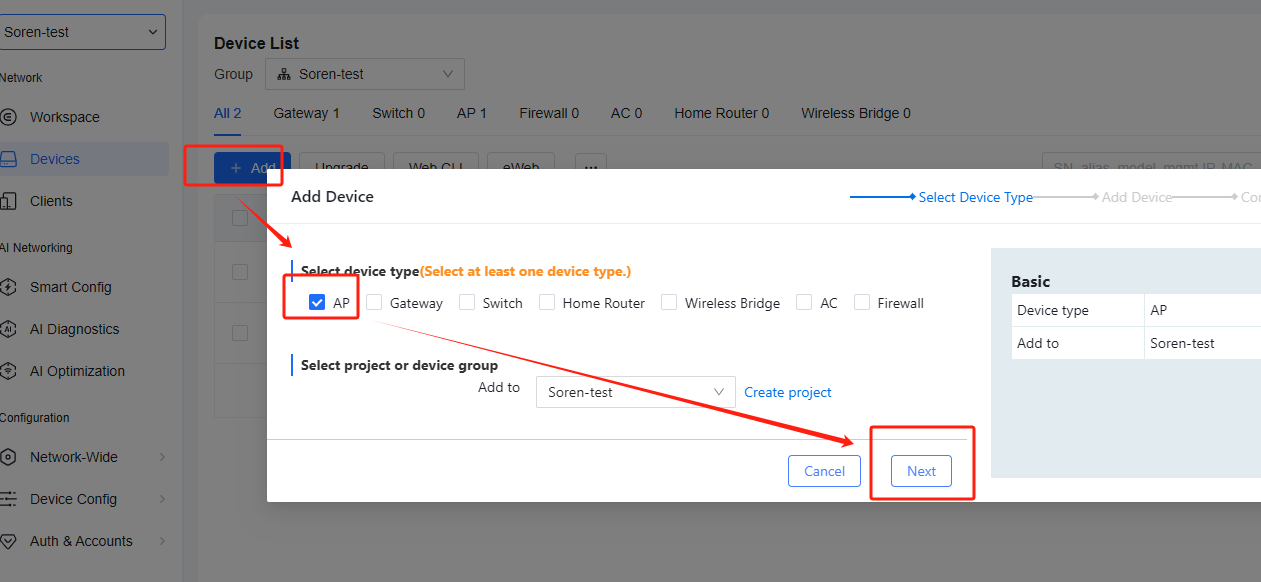 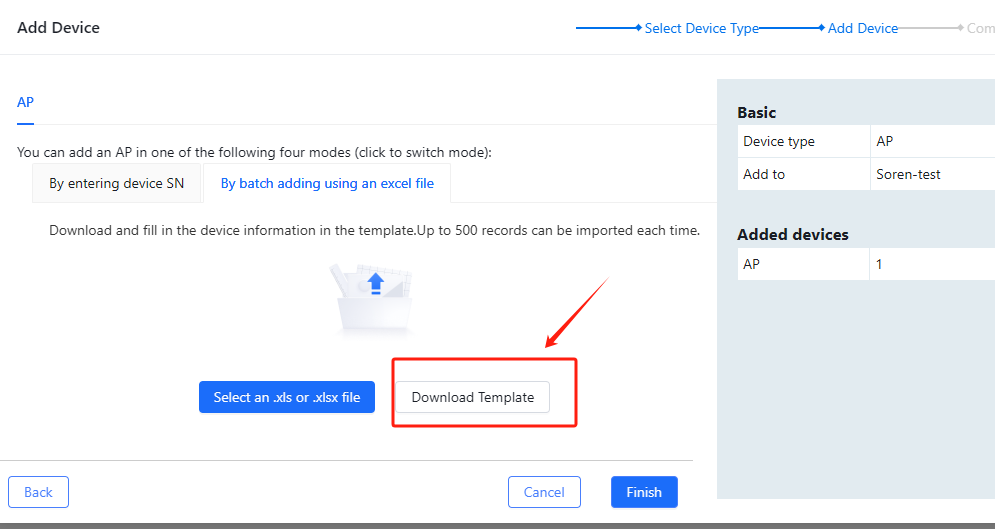 Regarding the second point: You can confirm the naming rules with the on-site personnel. Regarding the third point: You can separate the management IP subnet of the equipment from the SSID IP subnet according to the actual site requirements. If static IP needs to be used at the site, you can manually configure the static IP for the device through the EWEB interface of the gateway device (the device and the gateway must be in the same Layer 2 environment) Regarding the fourth point: You can learn more about SON through this link--->https://community.ruijie.com/forum.php?mod=viewthread&tid=2353&extra=page%3D3 Best regards Soren |
GTAC-Soren replied at 2026-3-3 14:01 Thanks for the Batch Import template, Soren. One critical question regarding the timing: Do the APs need to be physically online and connected to the project at the time I perform the Batch Import and Sync? In our workflow, we want to pre-configure all 100+ APs in the Cloud today (mapping SNs to Names and Static IPs), but the actual physical installation might happen 7 days later.
|
User 11119 replied at 2026-3-9 17:19 Hi sir, 1. Do you need to pre-configure the IP Address of the AP? This cannot be pre-configured because the AP can only go live on the cloud after it has obtained an address. 2. If the pre-configuration you added in the cloud is successful, when you add an AP, the configuration will be automatically synchronized without any time limit. Best regards, Steve |
Steve replied at 2026-3-9 18:47 Hi Steve, thanks for the previous info. To be very specific about our workflow for this 100+ node project, I need to know Can I perform the DHCP Reservation (Static MAC-to-IP Binding) in the Ruijie Cloud before the physical devices are plugged into the network? Our plan is to scan the MAC addresses from the device boxes, import them into the Gateway's DHCP reservation table via the Cloud, and then send the devices to the site. We want to ensure that the moment a device is plugged in for the very first time, it immediately receives its reserved IP from the Gateway. Is there any requirement that the device must be 'Online' or 'Seen by the Cloud' at least once before we can bind its MAC address to a Static IP? Or is Offline Binding fully supported?" I have a few technical questions before we proceed with the implementation: Hardware Capacity: What is the maximum number of DHCP Static Binding entries supported by the EG Series Gateway? I need to ensure the hardware can handle 100+ entries without performance issues. Config Persistence: Once I sync the reservation list from the Cloud, does the Gateway automatically save these to its Startup-Config? Will the local DHCP server still assign the correct reserved IPs even if the devices go online 7-14 days later, or if there is a WAN outage? Verification: After the sync, is there a way to verify the total number of successfully bound MAC addresses via the Cloud Web Portal? I need these technical details to finalize our 'As-Built' design and ensure a smooth deployment. |
User 11119 replied at 2026-3-9 21:24 Hello, 1. Is there any requirement that the device must be 'Online' or 'Seen by the Cloud' at least once before we can bind its MAC address to a Static IP? Or is Offline Binding fully supported?" --- The IP acquisition of the device can be done before adding the cloud. You need to configure the device locally first. Only after the device has obtained the address you have set and get the internet normal will it be able to go online on the cloud. Before obtaining the address, the device's status in the cloud does not affect the process by which the device acquires the address. 2. What is the maximum number of DHCP Static Binding entries supported by the EG Series Gateway? ---This depends on the performance of different EGs. Here is a set of parameters for your reference. If you want to obtain more detailed and accurate information, please provide the specific model. https://community.ruijie.com/forum.php?mod=viewthread&tid=1820&page=1&extra=#pid2844 3. Once I sync the reservation list from the Cloud, does the Gateway automatically save these to its Startup-Config? Will the local DHCP server still assign the correct reserved IPs even if the devices go online 7-14 days later, or if there is a WAN outage? ---Once the gateway is online on the cloud, the configuration of the cloud is synchronized with the local configuration of the gateway. Any configuration changes made locally or on the cloud will be synchronized to the gateway. 4. After the sync, is there a way to verify the total number of successfully bound MAC addresses via the Cloud Web Portal? ---The following screenshot shows the path for viewing the IP-MAC binding information in the cloud. 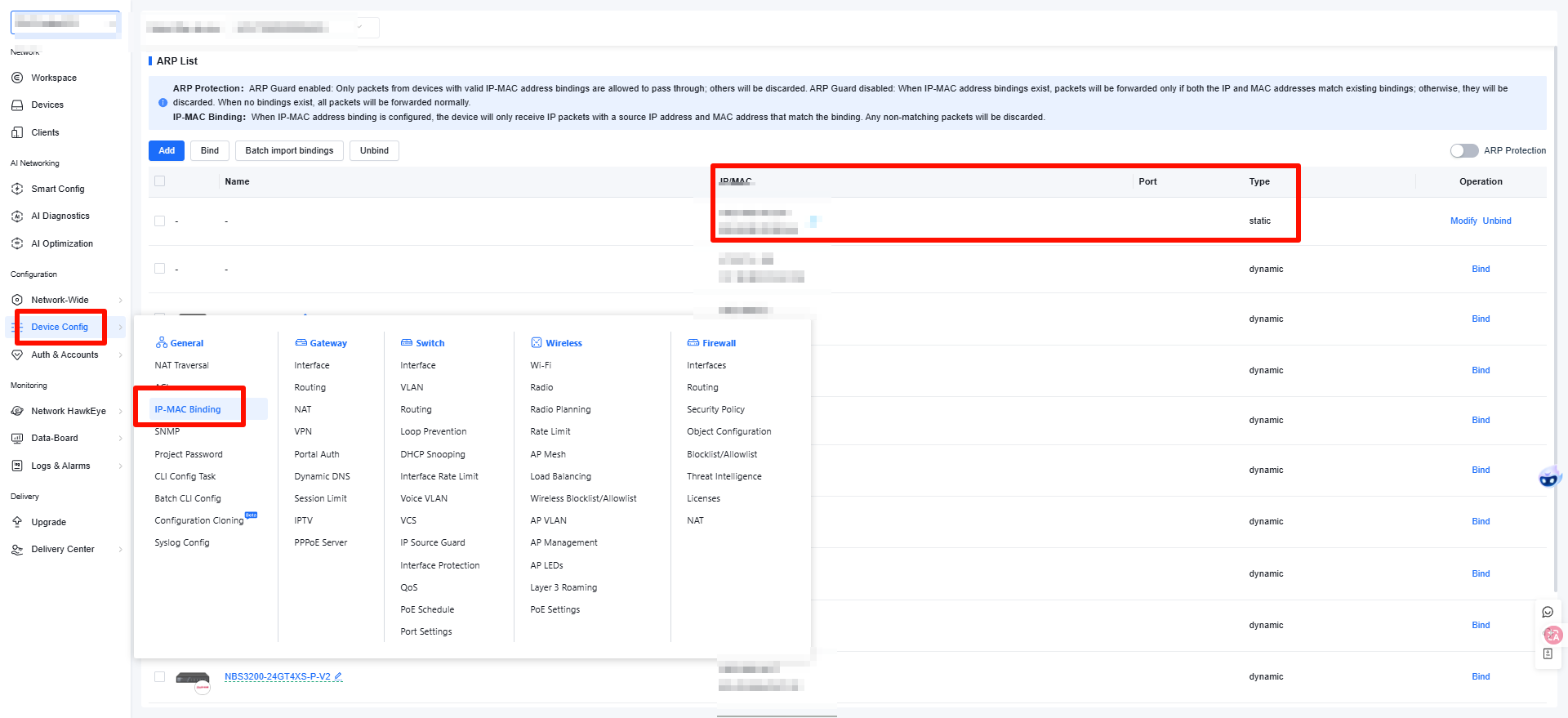 Best regards, Micca |
This site contains user submitted content, comments and opinions and is for informational purposes only. Ruijie may provide or recommend responses as a possible solution based on the information provided; every potential issue may involve several factors not detailed in the conversations captured in an electronic forum and Ruijie can therefore provide no guarantee as to the efficacy of any proposed solutions on the community forums. Ruijie disclaims any and all liability for the acts, omissions and conduct of any third parties in connection with or related to your use of the site. All postings and use of the content on this site are subject to the Ruijie Community Terms of Use.
More ways to get help: Visit Support Videos, call us via Service Hotline, Facebook or Live Chat.
©2000-2023 Ruijie Networks Co,Ltd


 Level 1