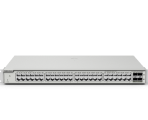
RG-NIS2100 Managed mode not shown in Cloud config
|
Edited by K-Net at 2026-10-8 00:30 RG-NIS2100-8GT2SFP-HP , latest ESW_1.0(1)B1P58,Release(13202515) firmware. Locally enabled VLAN mode Vlans configured correctly , including Vlan managemen Ip address All is working fine but going to Cloud configuration->VLAN it is still in Un-managed Mode. Is it a bug? Is it safe enabling once again the managed mode via Cloud config ? Before doing so via Cloud it says : Tip Once the switch is switched to the management mode, all ports of the switch will be in access VLAN 1, and upstream devices may be unable to access the Internet. Configure VLANs as needed after mode switching. So I suppose I will lose connectivity due to Vlan reset. Please let me know. Thanks. |
|
Hello, Apologies for the inconvenience, but the information is unclear, is it possible to share a capture of the output you mention? If you need help about VLANs configuration for your device, you can check the information in the following manual: https://reyee.ruijie.com/en-global/support/documents/slide_rg-es2-nis2100-series-switches-1-0-1-b1p58-configuration-guide/#_Toc231287758 If you need further help, you can contact us in Rita Live chat to have a more dynamic conversation, we can help you check your service: https://www.ruijienetworks.com/rita Regards. |
Edited by K-Net at 2026-10-8 23:56 GTAC-Jason replied at 2026-10-8 04:57I'll try to be more clear: I have configured this switch via web interface inside my LAN I have enabled the Managed mode I have configured all Vlans I switched the management IP address 192.168.99.100 to vlan 99 and it can reach internet. All is working fine. Then I have connected successfully this switch to Ruijie cloud, dedicated project. Once I login to Ruijie cloud to manage the switch , if I go to CONFIGURATION-VLAN , it shows the switch still in UN-MANAGED mode: 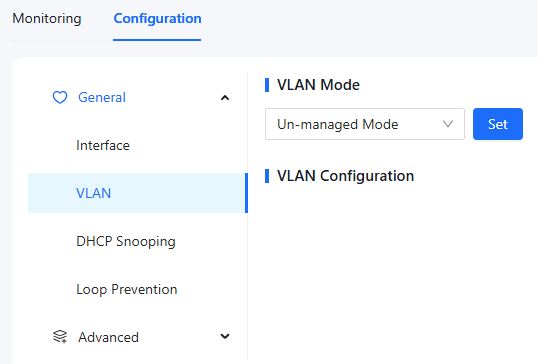 But this is not true, as said, the switch has been configured with all VLANs and it is working perfectly in this mode. That's the problem. |
K-Net replied at 2026-10-8 23:54I understand, according to the documentation, the VLAN is shown as unmanaged if the VLAN is disabled.  As I understand, you are using VLAN99 instead of VLAN1 as the native VLAN, right? There could be a synch mismatch between the local and the cloud information. You can try to upgrade the topology from the cloud:  If the issue persists, I would suggest to contact us in Rita live chat to check the issue directly in your project. Regards. |
GTAC-Jason replied at 2026-10-9 04:51 Topology update didn't solve the issue. Further info: I'm configuring the switch via PC browser connected locally to switch LAN At the same time I am connected with another PC to Ruijie cloud. If I made a change (i.e. I disable an ethernet port) via cloud interface, I can see immediately this change on the local LAN PC config page. If I made a change (i.e. re-enable that ethernet port) via local PC , I see immediately the change on Ruijie cloud. So all is perfectly synced. The problem is the VLAN section on cloud interface is still displayed as Un-managed (see my previous post). That's why this makes me think to a bug. On the same LAN/Project there are also three NBS3200 series switch, NO issue at all with displayed cloud configuration. |
K-Net replied at 2026-10-9 22:22 Thank you very much for your reply, sir. This sounds very much like a bug issue. If it is convenient for you, could you please get in touch with me and my team via the real-time chat platform? Currently, replying through posts may not be conducive to us resolving this issue quickly and efficiently. Once we get in real-time contact, we will track this issue for you separately. |
GTAC-Eric replied at 2026-10-9 22:45 Sure, I have to setup two NIS2100 more on the same LAN , let's see how they goes, then we'll meet via chat. |
This site contains user submitted content, comments and opinions and is for informational purposes only. Ruijie may provide or recommend responses as a possible solution based on the information provided; every potential issue may involve several factors not detailed in the conversations captured in an electronic forum and Ruijie can therefore provide no guarantee as to the efficacy of any proposed solutions on the community forums. Ruijie disclaims any and all liability for the acts, omissions and conduct of any third parties in connection with or related to your use of the site. All postings and use of the content on this site are subject to the Ruijie Community Terms of Use.
More ways to get help: Visit Support Videos, call us via Service Hotline, Facebook or Live Chat.
©2000-2023 Ruijie Networks Co,Ltd


 Level 1