Router not sync
Router not sync with apps properly and very slow with both apps always show wrong bandwidt Ruijie 3000gx |
|
What is your network connection method (wired or wireless)? Are other devices experiencing normal network speeds? Have you tried restarting the router or checking network settings? You can try the following methods to check: Restart the router: Try restarting the EW3000GX router to see if it improves the speed. Check connected devices: Check the number of devices connected to the router and try to reduce the number of devices online simultaneously. Signal strength test: If using a wireless connection, try moving closer to the router to test the speed to confirm if it's a signal issue. Check speed limiting settings: Log in to the router's management interface to check for any speed limiting configurations and adjust them if necessary. Firmware upgrade: Ensure the router's firmware is up-to-date and upgrade if necessary. |
GATC-Emily replied at 2026-1-4 15:28 Reset router Check from close same Check from wire connection same Try reboot same Check from wireless same It’s bug plz fix that Always show wrong bandwidth |
GATC-Emily replied at 2026-1-4 15:28 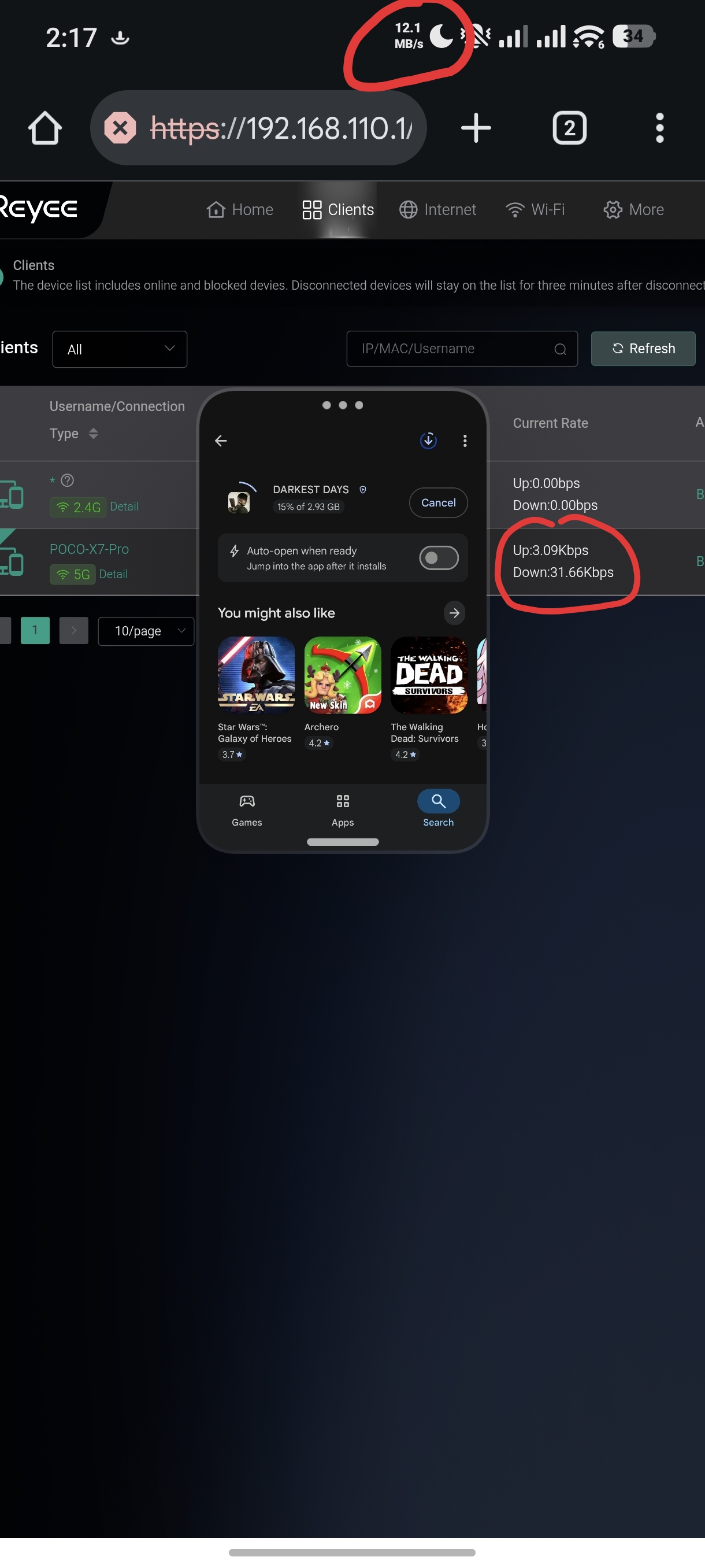 plz fix that ruijie 3000gx plz fix that ruijie 3000gx |
Sabbir Hossain replied at 2026-1-5 04:18 Hi sir, Could you download a file using your phone to do a test? If still have this issue, please contact us via RITA:RITA Robot/Live Chat: www.ruijienetworks.com/rita Best regards, Steve |
Steve replied at 2026-1-5 09:53 Yeah downloading, browsing,streaming, gaming Can u plz forward this bug issu ur developer for fixing this? |
This site contains user submitted content, comments and opinions and is for informational purposes only. Ruijie may provide or recommend responses as a possible solution based on the information provided; every potential issue may involve several factors not detailed in the conversations captured in an electronic forum and Ruijie can therefore provide no guarantee as to the efficacy of any proposed solutions on the community forums. Ruijie disclaims any and all liability for the acts, omissions and conduct of any third parties in connection with or related to your use of the site. All postings and use of the content on this site are subject to the Ruijie Community Terms of Use.
More ways to get help: Visit Support Videos, call us via Service Hotline, Facebook or Live Chat.
©2000-2023 Ruijie Networks Co,Ltd


 Level 1