 I created a new vlan and added to the trunk port, but it doesn't have an internet connection.
|
I created a new VLAN, which is 40; the IP address would be 10.40.0.1. When I connect a device to that VLAN, it doesn't have a internet connection. What I tried: Device 1 is connected to that new VLAN 40, which doesn't have internet and can't ping other VLANs within the L3 switch. Device 2 is connected to another VLAN: it can access the internet and can ping Device 1 and the SVI of VLAN 40. What is the cause of this? |
|
Hello sir, what is the model of your device? Is it configured with a DHCP address pool? And is the device configured to allow this VLAN on the downlink interface? |
GATC-Emily replied at 2026-1-6 14:36 L3 Switch Model: CS83-24GT4XS-P Yes, my device can get an IP from that VLAN, and it is pointed to the port interface. |
Trusty Hoister replied at 2026-1-6 14:40 Hello sir, What is your network topology? After connecting to VLAN 40 and obtaining an IP address, can you successfully ping the gateway IP address and the upstream device's IP address? Also, are you enabling DHCP snooping on any ports? If so, please disable it and test again. |
GATC-Emily replied at 2026-1-7 09:58 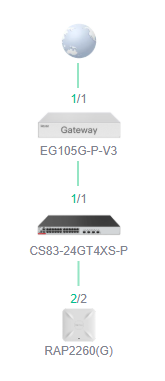 This is my topology. The VLANs are configured in the L3 switch. And DHCP snooping was enabled and disabled already but didn't work. |
This site contains user submitted content, comments and opinions and is for informational purposes only. Ruijie may provide or recommend responses as a possible solution based on the information provided; every potential issue may involve several factors not detailed in the conversations captured in an electronic forum and Ruijie can therefore provide no guarantee as to the efficacy of any proposed solutions on the community forums. Ruijie disclaims any and all liability for the acts, omissions and conduct of any third parties in connection with or related to your use of the site. All postings and use of the content on this site are subject to the Ruijie Community Terms of Use.
More ways to get help: Visit Support Videos, call us via Service Hotline, Facebook or Live Chat.
©2000-2023 Ruijie Networks Co,Ltd


 Level 1


