WMM & DSCP Tunning for AC & AP
|
Edited by Pambuka at 2026-4-1 13:10 I have configured WMM & DSCP on the Ruijie RG-SC6705-SP controller to make online meeting traffic more stable. However, after implementation, the online meetings are still unstable and frequently disconnected. Are there any other configuration suggestions that can be tried, and are there any alternative solutions? The issue observed is high channel usage (around 70–90%) on both 2.4 GHz and 5 GHz, along with significant interference from other nearby APs this is the config : 1. Config AP WMM + EDCA Tunning WLC#conf t WLC(config)#ap-config AP2 WLC(config-ap)#wmm enable radio 1 WLC(config-ap)#wmm edca-client voice aifsn 2 cwmin 2 cwmax 3 txop 50 radio 1 WLC(config-ap)#wmm edca-radio voice aifsn 1 cwmin 1 cwmax 3 txop 50 radio 1 WLC(config-ap)#wmm edca-client video aifsn 2 cwmin 3 cwmax 4 txop 94 radio 1 WLC(config-ap)#wmm edca-radio video aifsn 1 cwmin 2 cwmax 3 txop 94 radio 1 2. Config WLAN DSCP – WMM Mapping WLC(config)#wlan-config 1 WLC(config-wlan)#wlan-qos map-table dot11e-tunnel-dscp import 7 export 46 WLC(config-wlan)#wlan-qos map-table dot11e-tunnel-dscp import 5 export 34 |
|
Dear Sir, if you find that the signal currently used by the AP has significant co-channel interference, you can use your phone to scan for nearby channels that are more idle and switch the AP to use the idle channel best regards Scenty |
GTAC-Scenty replied at 2026-4-1 13:29 i tried all the channel and everything is not ideal because very strong interference, do u have another tips for this issue? 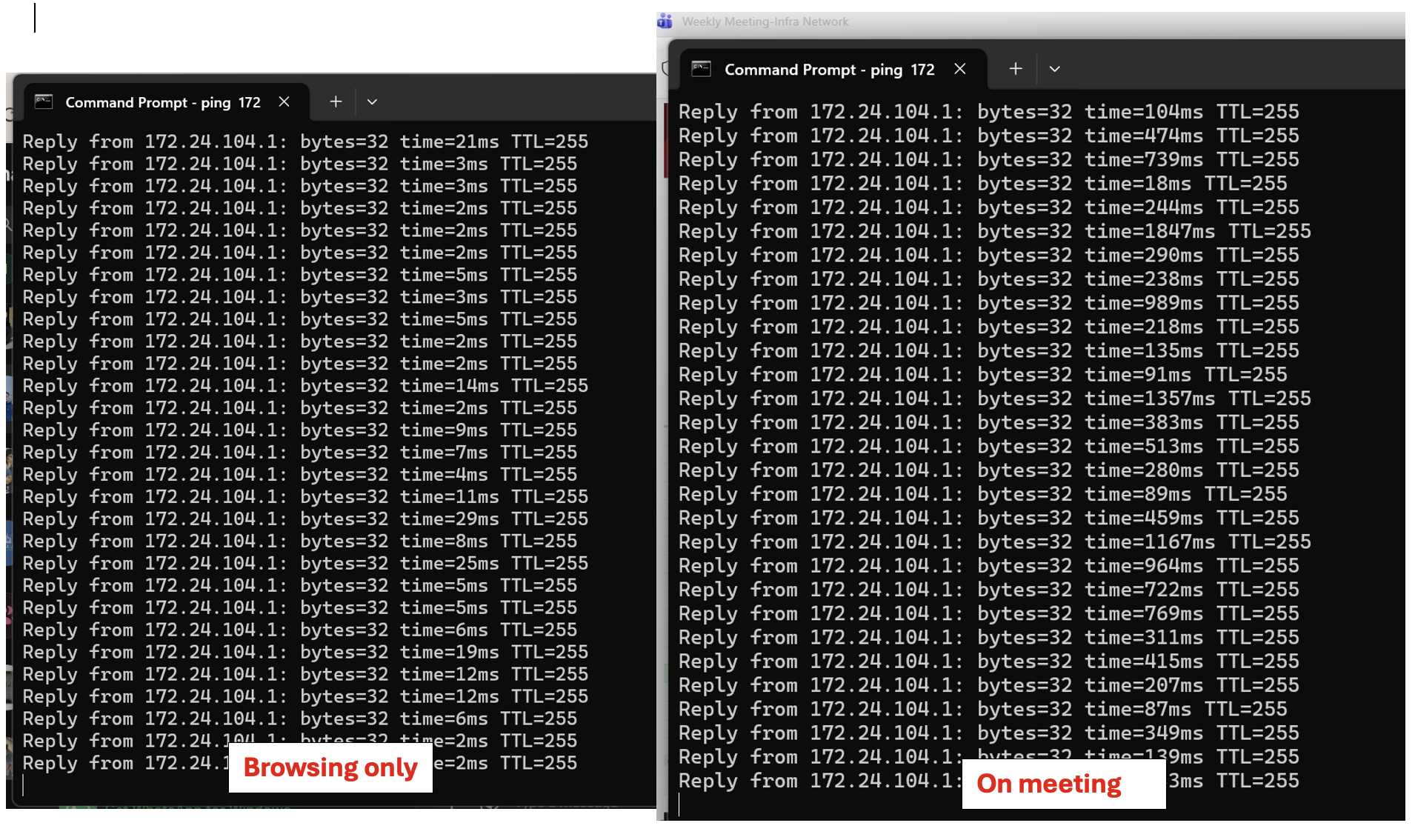 |
Pambuka replied at 2026-4-1 14:23 Dear sir, Good day. In this situation, it's necessary to consider whether the locations where your wireless devices are installed are too dense, leading to severe interference between access points (APs). Channel planning is also crucial in this case: 2.4GHz: Only three non-overlapping channels (1, 6, and 11). In enterprise environments, try to disable 2.4GHz or retain only a small amount of access capability unless there are older IoT devices that require it. Interference in 2.4GHz is almost unavoidable. 5GHz/6GHz: As the primary frequency band. Use high-frequency channels (e.g., 149-165) and low-frequency channels (36-64) for physical isolation to ensure that the cellular coverage of adjacent APs does not overlap. Best regards, Lex |
This site contains user submitted content, comments and opinions and is for informational purposes only. Ruijie may provide or recommend responses as a possible solution based on the information provided; every potential issue may involve several factors not detailed in the conversations captured in an electronic forum and Ruijie can therefore provide no guarantee as to the efficacy of any proposed solutions on the community forums. Ruijie disclaims any and all liability for the acts, omissions and conduct of any third parties in connection with or related to your use of the site. All postings and use of the content on this site are subject to the Ruijie Community Terms of Use.
More ways to get help: Visit Support Videos, call us via Service Hotline, Facebook or Live Chat.
©2000-2023 Ruijie Networks Co,Ltd


 Level 1