How configure a Server DNS on EG310GH-E
|
I need to configure a server DNS for all LAN with IP address 1.1.1.1 - 8.8.8.8 How Configure It ? My router is RG-EG310GH-E |
|
Hello, You can see how to configure your device in the following manual: https://reyee.ruijie.com/en-global/support/documents/slide_ruijie-reyee-rg-eg-series-routers-reyeeos-2-410-configuration-guide/#_Toc227338041 The information regarding the DNS configuration is in section: 4.7 Configuring DNS 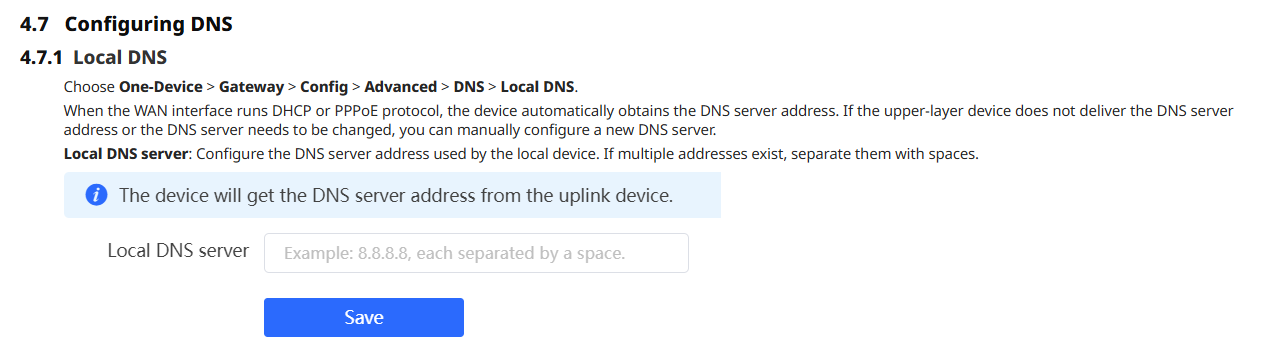 You can see more advanced options in that same section. Please let us know if this answer your needs. Best regards. |
This should be configured in the [strong]DHCP DNS option[/strong], so devices automatically receive the DNS servers when they connect.Through Ruijie Cloud
1.1.1.1 8.8.8.8
Through the router’s local interface
1.1.1.1 8.8.8.8
|
This site contains user submitted content, comments and opinions and is for informational purposes only. Ruijie may provide or recommend responses as a possible solution based on the information provided; every potential issue may involve several factors not detailed in the conversations captured in an electronic forum and Ruijie can therefore provide no guarantee as to the efficacy of any proposed solutions on the community forums. Ruijie disclaims any and all liability for the acts, omissions and conduct of any third parties in connection with or related to your use of the site. All postings and use of the content on this site are subject to the Ruijie Community Terms of Use.
More ways to get help: Visit Support Videos, call us via Service Hotline, Facebook or Live Chat.
©2000-2023 Ruijie Networks Co,Ltd


 Level 1